
How to Use the SaaSi Hub Dashboard
Our dashboard gives you a central overview of your organisation’s SaaS environment, bringing together key information about your applications, employees, licences, spending and potential optimisation opportunities. It is designed to provide a quick snapshot of what is happening across your SaaS estate without requiring you to open individual applications or manually compare information across different systems.
What Does the Dashboard Show?
Once your HR system and SaaS applications are connected, SaaSi Hub begins bringing the available information together into your dashboard. This provides an at-a-glance view of your SaaS environment, helping you understand areas such as:
- Your connected SaaS applications
- Employees associated with your software
- SaaS licences and subscriptions
- Software spending
- Potential savings and waste
- Employee leavers with active SaaS access
- Other SaaS management insights requiring attention
The information available will depend on the applications and systems you have connected to SaaSi Hub.
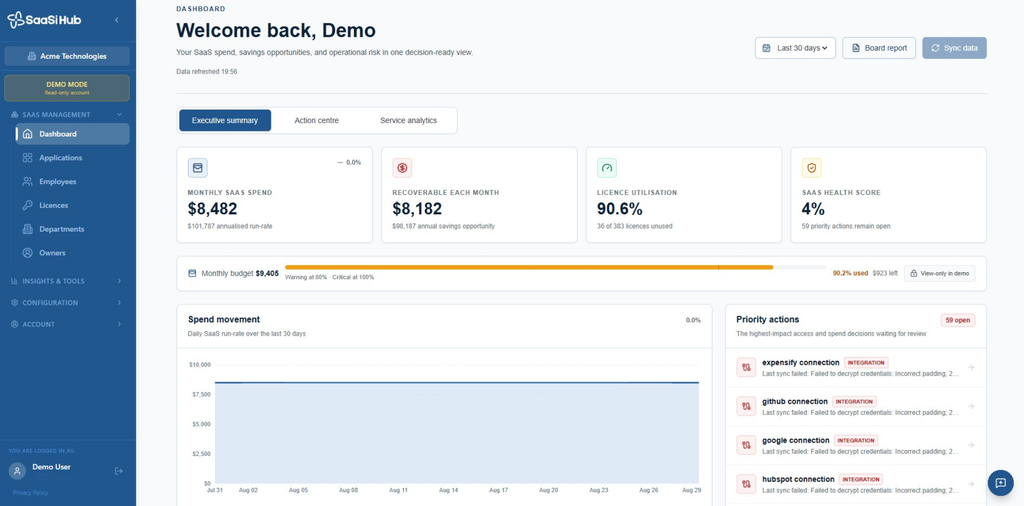

Understanding Your SaaS Overview
The dashboard is intended to give you a high-level view first. Rather than immediately analysing individual subscriptions, you can use the overview to understand the general state of your SaaS environment and identify areas that may require a closer look.
For example, the dashboard may help you identify potential unused licences, subscriptions associated with employees who have left the organisation, or areas of SaaS spending that warrant further investigation. SaaSi Hub uses connected SaaS and HR information to surface these kinds of opportunities. From there, you can move into the relevant area of the platform to investigate further.
Going Beyond the Dashboard
The Dashboard provides the overview, while the ‘SaaS Management’ and ‘Insights & Tools’ sections allow you to investigate particular areas in more detail.
For example, you can use:
- Applications to view and manage the SaaS applications within your organisation.
- Employees to understand which employees are associated with your SaaS applications and licences.
- Licences to review licence allocations and identify potential opportunities for optimisation.
- Departments and Owners to understand where applications sit within your organisation and who is responsible for them.
- Renewal Calendar to review upcoming subscription renewals and commitments.
- Cost Analytics to understand where SaaS money is going and how spending is changing.
- Shadow IT to identify potential SaaS applications and spending that may sit outside your managed software environment.
- Reports to generate more structured information for Finance, IT, leadership and other stakeholders.
Each of these areas has its own purpose, allowing you to move from the high-level Dashboard overview into the specific information you need to investigate or manage.
Keeping Your Dashboard Up to Date
The usefulness of your dashboard depends on the information available to SaaSi Hub. Connecting your HR system and supported SaaS applications allows SaaSi Hub to synchronise relevant information automatically, while self-integrations allow you to manually add subscription information for applications that aren’t currently supported through Auto-Integration. Keeping this information accurate helps provide a more complete picture of your organisation’s SaaS environment.
Using the Dashboard Day to Day
You don’t necessarily need to investigate every figure each time you sign in. Instead, the dashboard can act as your starting point for SaaS management. Review the overall position, identify anything that appears to require attention, and then move into the appropriate section of SaaSi Hub for further investigation.
This creates a simple workflow: See the bigger picture → identify what needs attention → investigate the detail → make an informed decision.
In short, the SaaSi Hub Dashboard gives you a central starting point for understanding your applications, employees, licences and SaaS spend, while the wider platform provides the tools needed to investigate and manage each area in greater detail.