
Utilising Our Renewal Calendar Feature
The renewal calendar gives you a central view of upcoming SaaS renewals, helping you understand what is due, when action may be required and how much spending is coming up for renewal.
Rather than treating renewal dates as simple calendar reminders, SaaSi Hub brings renewal timing together with subscription costs, ownership and other SaaS information so you can prioritise the renewals that need attention.
What Does the Renewal Calendar Show?
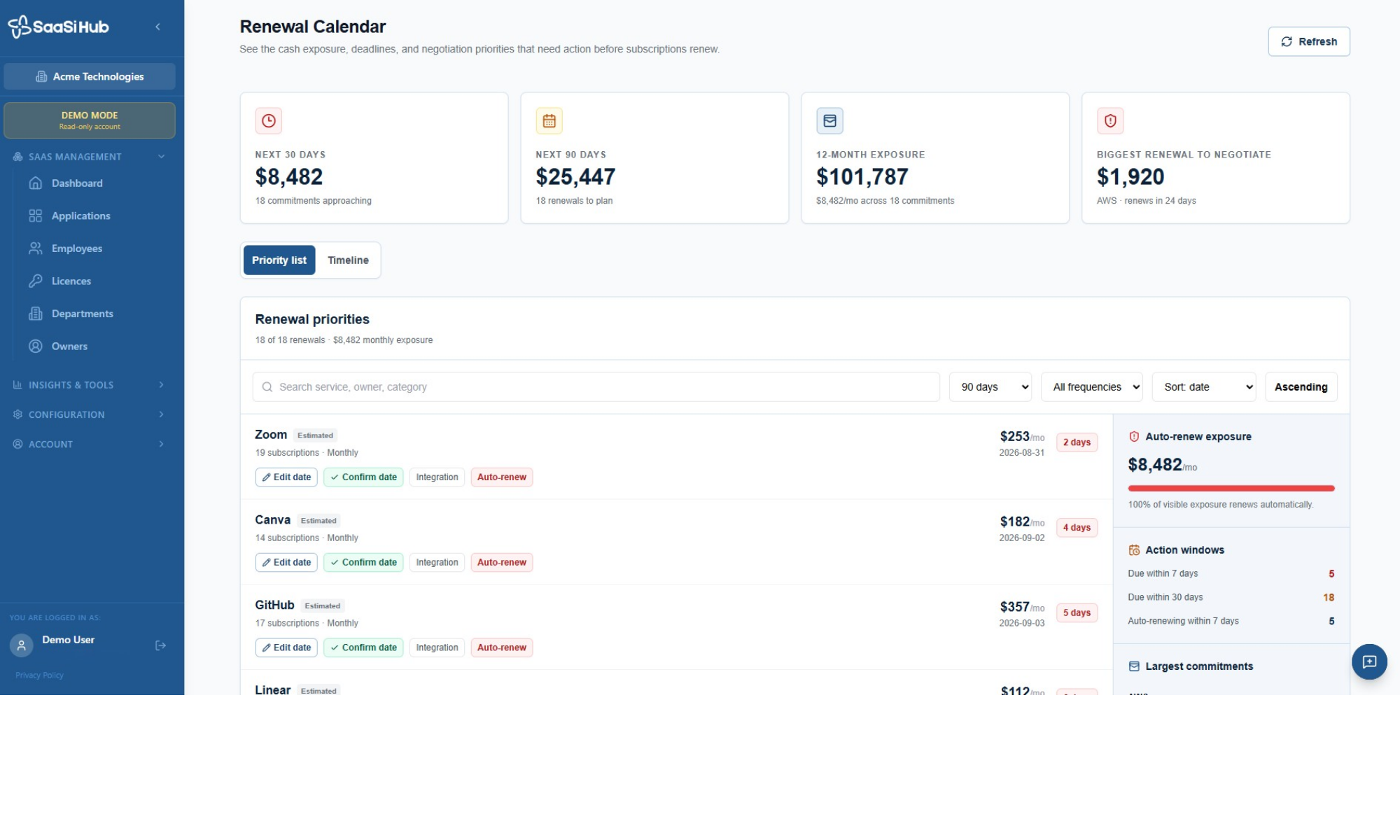
The renewal calendar provides an overview of your upcoming subscription commitments, including key figures for different time periods. At the top of the page, you can see:
- Next 30 Days: The value of subscriptions approaching renewal within the next 30 days.
- Next 90 Days: The total value of renewals coming up within 90 days.
- 12-Month Exposure: The value of subscription commitments across the next 12 months.
- Biggest Renewal to Negotiate: The largest upcoming renewal that may require attention.
This gives you an immediate picture of your upcoming SaaS financial exposure before looking at individual subscriptions.
Renewal Priorities
The ‘Renewal Priorities’ section lists upcoming renewals and allows you to focus on the subscriptions that need attention first. Each renewal can show information such as the application, number of subscriptions, billing frequency, monthly cost and expected renewal date.
You can search for a particular service, owner or category, while filters allow you to narrow the list by timeframe and renewal frequency. The list can also be sorted by date and displayed in ascending or descending order. This makes it easier to work through upcoming renewals without having to manually search through individual subscriptions.
Reviewing Renewal Dates
SaaSi Hub allows you to review and manage the renewal dates shown for subscriptions. Where a renewal date is marked as ‘Estimated’, you can use ‘Edit Date’ to update it when you have confirmed information from the provider or subscription documentation.
Once you have verified the date, you can use ‘Confirm Date’ to indicate that the renewal information has been checked. This helps distinguish confirmed renewal information from dates that may still require verification.
Identifying Auto-Renewal Exposure
The Renewal Calendar also highlights ‘Auto-renew Exposure’, showing the monthly value of subscriptions that are set to renew automatically. This is useful because an automatic renewal can create a financial commitment without requiring a new purchase decision at the time of renewal.
By identifying these subscriptions ahead of time, teams have an opportunity to review whether the software is still required, whether the current subscription is appropriate and whether there is an opportunity to negotiate before the renewal takes place.
Action Windows
The ‘Action Windows’ section provides another way to prioritise upcoming work.
It highlights renewals that are:
- Due within 7 days
- Due within 30 days
- Auto-renewing within 7 days
This helps teams quickly identify subscriptions where a decision or action may be needed soon.
The renewal calendar can also help identify significant upcoming commitments. The ‘Largest Commitments’ area provides visibility into higher-value renewals, helping teams focus their attention where a renewal could have a greater impact on SaaS spending. This can be particularly useful when preparing for renewal discussions or deciding which subscriptions should receive additional review.
Managing Your Renewal Calendar
The Renewal Calendar is designed to be used as an ongoing part of SaaS management rather than something you only check when a renewal is approaching. Regularly reviewing upcoming dates can help organisations to confirm renewal information, identify subscriptions that need attention, review automatic renewals, prioritise larger commitments, prepare for upcoming renewal discussions and to avoid unexpected subscription renewals,
By keeping renewal information accurate and reviewing upcoming commitments regularly, organisations can make better-informed decisions about their SaaS subscriptions.
In short, the Renewal Calendar gives you a central view of what is renewing, when it is happening and where your attention may be needed before the next subscription commitment takes place.